
 Star on GitHub
Vibe coding Flutter & Dart - The ultimate guide
Generative AI is transforming how developers build software. In this article, we explore how to use AI agents to code entire applications in Dart, from frontends in Flutter to backends with Serverpod. You’ll learn how to set up an effective context and how to use tools like MCP servers and AGENTS.md files. We dive into how to avoid common pitfalls and produce as high-quality code as possible.
This article is also available as a video, if you prefer to watch rather than read.
What is vibe coding?
The term vibe coding was coined by Andrej Karpathy, one of the co-founders of OpenAI, in the following tweet. In essence, vibe coding is coding using AI without ever looking at the code.
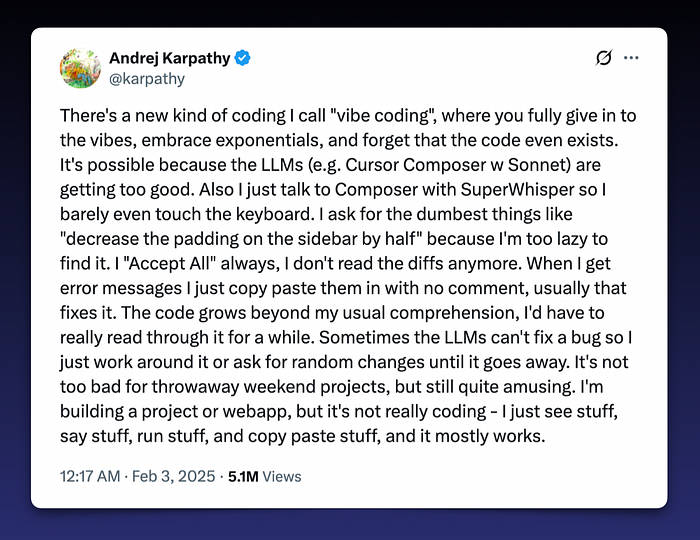
However, there are multiple interpretations of what vibe coding is, depending on who you are talking with:
- Pure vibe coding: only prompting, never looking at the code. This can be useful for rapid prototyping, when you just want to explore an idea without worrying about the underlying details.
- Hybrid vibe coding: prompting, reviewing, reprompting, and making occasional manual fixes. This is the most practical option for production-quality work, since it balances speed with oversight.
- Autocompletion: using AI as an advanced autocomplete, like what you get with Cursor. Many developers use this to speed up writing boilerplate or repetitive code.
After all, if we’re developers, we shouldn’t be too afraid of looking at the code. In this article, we will primarily discuss the middle alternative. Generating code, with occasional manual interventions.
How this guide came to be
While working on making Serverpod vibe-codable, I spent considerable time exploring the space. If you haven’t already heard about Serverpod, it’s an open-source, scalable app server written in Dart for the Flutter community. It lets you use Dart for your full stack, it’s super easy to get started with, and it even automatically generates your full API. Serverpod comes with batteries included and supports everything from real-time communication and talking with your database to authentication and file uploads. Check it out.
Tools for vibe coding
There’s no shortage of tools: Cursor, Gemini CLI, Codex, Claude Code, and many more. Some tools, like Dreamflow and Firebase Studio, aim to be more “vibey”, where you don’t have to look at code, only the generated app itself. Tools change fast, so rather than getting hung up on specifics, we will be focusing on the principles. Once you understand the principles, switching tools is easy. This is similar to learning programming: if you focus on the principles rather than learning a specific language, learning new languages becomes easier.
The principle of context
Context is everything in vibe coding. Models don’t know your project, frameworks, or codebase unless you provide that information. Better context means better code. But a longer context often leads to worse performance. Models drift, and once they drift, they rarely recover. Keeping the context short is crucial to getting good performance out of an LLM.
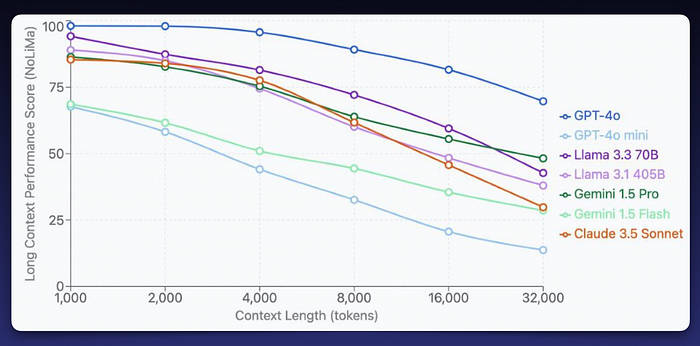
The above numbers are a bit dated, but they illustrate the point: performance already starts to deteriorate at just a few thousand tokens. Imagine what happens at a million tokens. Shorter context windows mean more accurate results.
Why this happens: Models give more weight to the beginning and end of a context window, and as the context grows, earlier details are often “forgotten” or overwritten. That's why keeping prompts focused and trimming unnecessary context is so important.
There are a number of ways we can give our coding agent better context:
- Project files: letting the agent read relevant files in our project.
- Product requirements document (PRD) and implementation plan: a detailed description of the app, features, tech stack, and design considerations. The PRD is often paired with a detailed implementation plan (usually PLAN.md).
- AGENTS.md file: initial instructions and rules, which are included at the start of context.
- MCP servers: Model Context Protocol servers that provide additional, structured context.
Let’s explore our different options and how we can make the most out of them.
Product requirements document (PRD) & Implementation plan
A PRD collects all the overarching information about your project. It’s easy to create one with your favorite AI agent. For example, when building a conference app with Flutter and Serverpod, I asked the agent to generate it for me:
“Write a product requirements document (PRD.md). I’m building a conference app with Flutter and Serverpod. I want to have three types of users: attendees, speakers, and admins…”
Add as many details about the app you want to build as possible in your prompt. Make sure that it includes the following:
- A clear and detailed app description.
- Any features and functionality you want to include.
- Technologies used, Dart packages, state management, etc.
- Design and UX considerations.
- Data models and project structure.
With the PRD in place, you can move on to the implementation plan. Ask the AI to create a PLAN.md file based on your PRD. For example:
“I’m building an app. Look at the requirements in PRD.md and make a full step-by-step implementation plan, a PLAN.md document. Include a checklist for each step at the end.”
The resulting plan provides structure, and the checklist is especially useful since the AI can check off progress as it works on the app and will serve as a reminder of what to work on next.
AGENTS.md and the .agents directory
The AGENTS.md file is very important, as it is one of the first things the agent will include in its context. Here you can include rules, references to your PRD.md and PLAN.md, and anything else the agent needs to know about. Here are a few things that you may want to include in your AGENTS.md file:
- A short description of your project.
- References to your PRD and implementation plan.
- Instructions on how to write tests. Make sure to tell the agent to always run
dart testanddart analyzeafter completing a task. - Instructions on how and when to access your MCP servers. Without this in your agents file, chances are the agent will never use them.
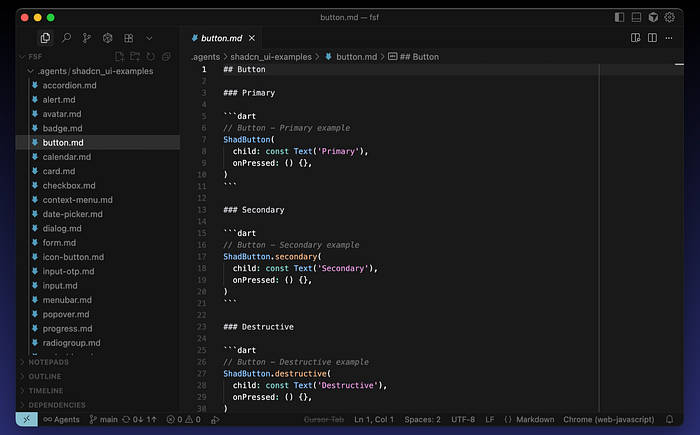
You can extend the context further by placing additional files in the .agents directory. Here, you place files that the agent can access, but doesn't need to include with its context for every single task. For example, I'm using shadcn_ui for the UI in an app I'm building. The models have very limited knowledge about this package. So, I prompted the agent to create markdown files with relevant example code. This is the prompt I used:
Clone the documentation for shadcn_ui from GitHub. Then, find all code examples, create an individual markdown file for each widget with a minimal example of its usage. Place the files in the ./agents/chadcn_ui directory.
This gave me a set of markdown files, one file for each widget, all with relevant examples. LLMs love examples; it works much better when they see code rather than just text descriptions.
Finally, the golden rule: whenever the AI gets something wrong, add a new rule to AGENTS.md. Chances are that it will perform better next time. In a sense, this becomes your agent’s memory, making it smarter over time.
MCP servers
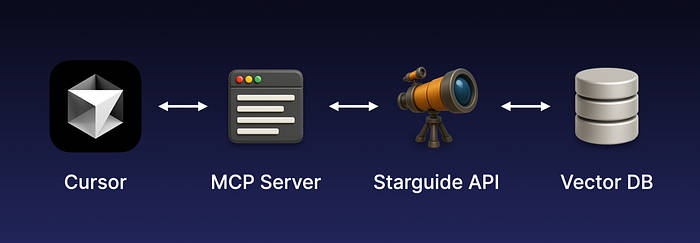
MCP (Model Context Protocol) allows agents to interact with external tools and resources. They can expose commands, tests, files, and services. For example, Serverpod’s MCP integrates with StarGuide, an open-source app that lets you chat with our documentation. StarGuide uses RAG (retrieval-augmented generation) to surface relevant docs and answers from GitHub discussions. When integrated through the MCP, agents can ask questions about Serverpod in natural language and get relevant information and code examples back.
How it works in practice: Imagine you’re building a Flutter app and the agent needs clarification about a Serverpod API. Instead of relying only on its training data, it can query the MCP server, which fetches the answer from StarGuide (backed by a vector database). The response is passed back to the agent and woven into the agent’s workflow seamlessly.
While some MCP servers (Dart, I’m talking about you) just expose CLI commands like pub get or dart test. The agents are usually smart enough to run the CLI commands themselves anyway, so the real value of MCPs lies in providing better context.
Vibe coding in practice
Finally, let’s look at how to best do the actual prompting. Here’s how to approach vibe coding effectively:
- Pick the right model for the job: I’ve had the best experience with GPT-5, which works great for Dart/Flutter, though it’s slow. Smaller models like Grok are faster but less reliable; they can be usable for quick and easy fixes. I hear good things about Claud, but haven’t gotten as good results as with GPT-5.
- Work incrementally: break down big tasks, review output carefully. The smaller the tasks we give our agent, the higher the chance of success.
- Fix strategically: sometimes manual fixes are faster than endless reprompting. Avoid getting stuck in the reprompting doom loop if it only takes you a few seconds to make the fix yourself.
- Keep context clean: continuously update your AGENTS.md, add examples, and improve the contexts.
Common Pitfalls
In reality, LLMs make a lot of mistakes. They tend to take shortcuts and do the least amount of work necessary to satisfy a prompt. Here are some pitfalls you’ll see often:
- Repetition: The AI may write two nearly identical methods one after another, instead of combining them into a single, reusable function.
- Redundant widgets and constants: Agents often fail to find existing code, opting instead to create new widgets, constants, or methods. This leads to multiple, slightly different implementations scattered throughout the project.
- Inconsistencies: The same type of problem may be solved in completely different ways across the codebase, which creates maintenance headaches.
- Overly complex solutions: Instead of relying on standard patterns, the AI sometimes generates convoluted, non-standard approaches that make the code harder to understand and maintain.
- Missed edge cases: Generated code often handles the happy path only, leaving out critical edge cases that can cause bugs later.
- Weak tests: Tests written by the AI frequently just verify the simplest, most obvious behavior, without covering error cases, edge conditions, or integration scenarios.
These issues can accumulate quickly. If you’re not careful, you’ll end up with a bloated, inconsistent codebase that becomes harder for both humans and AI to work with. These pitfalls are exactly the kinds of issues that create tech debt if left unchecked, so vigilance here saves future headaches. Sometimes it’s faster to fix things manually than to keep reprompting. Remember that vibe coding is meant to increase productivity, not slow you down.
Real-world examples
Here are two real-world examples that I challenged myself to almost exclusively use generated code to build:
- Cupertino Native: When Apple introduced liquid glass effects in iOS 26, I vibe-coded a proof of concept in Flutter over a weekend. It’s obviously not production-level code, but it shows the viability of the approach.
- Conference App: For the Full Stack Flutter conference, I’m vibe-coding an app (Flutter + Serverpod) for handling submissions and managing the schedule. I worked on this app in parallel with developing the MCP server for Serverpod.
Is vibe coding worth it?
Yes, it can be! For scaffolding, glue code, repetitive tasks, and prototyping, it can save some time. But generated code can be messy, and maintenance matters. If you let too much bad code into your project, the models will perform worse over time, and your ability to keep the project clean will suffer. Use vibe coding wisely: accelerate where it helps, but don’t let it erode your developer skills.
The future of coding
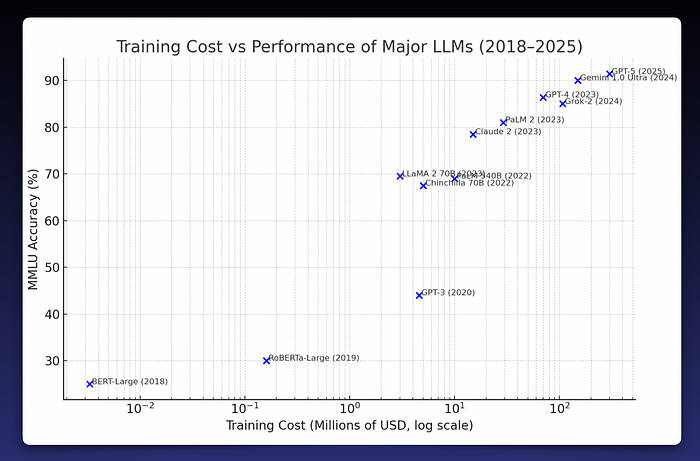
Will AI replace developers? Probably not anytime soon. The cost of training new models grows exponentially as they get more capable, and we may be reaching practical and economic limits. To train GPT‑5 already required massive computing resources, and the next step could cost ten or even a hundred times more. At some point, it becomes unsustainable. To go further, we’ll likely need something beyond current LLM technology. Here is a graph of the cost vs performance of current LLMs. Note that the x-axis with the cost is on a logarithmic scale.
For now, I think developers are safe. Many other jobs will be automated long before ours, and we’ll probably be the ones creating that automation. The more likely future is not that developers disappear, but that we become faster and more capable with AI as a powerful tool.
About the author
Viktor Lidholt is the founder and lead developer of Serverpod, an open-source backend written in Dart for the Flutter community. With a master’s in computer science and over 20 years of industry experience, Viktor has a solid background in software engineering. Before starting Serverpod, he worked at Google’s Flutter team in Silicon Valley. He has held talks and taught guest lectures on programming, app creation, and computer graphics at international conferences and universities such as MIT, Carnegie Mellon, and UC Berkeley.